Thursday, March 2, 2017

Secret Code's of Android Phone ( 86 full Android Secret Codes )

THIS IS  

86 full Android Secret Codes

note:some of features may not work for your phone

1. Kode:*#0*# Cek LCD, warna, vibrasi, speaker, sensor, dimming
2. Kode:*#0011# Cek kode untuk tes service mode
3. Kode:*#197328640# Cek kode seperti nomor 5 tapi simpel
4. Kode:*#1234# Cek kode versi android dari perangkat.
5. Kode:*#0842# Cek kode tes vibrasi

6. Kode:*#0228# Cek kode sinyal dan baterai
7. Kode:*#*#4636#*#* Cek kode phone information
8. Kode:#*#44336#*#* Cek kode pda, phone, csc, changelist number
9. Kode:**9998*5282# Cek kode Setting Java Server
10. Kode:*#9999#0# Cek kode Lcd

11. Kode:*#232331# Cek kode bluetooth
12. Kode:*#232338# Cek kode Wifi
13· Kode:*#232339# Cek kode wifi sama nomor 12
14· Kode:*#0842# Cek kode vibra motor
15· Kode:*#0673# Cek kode audio

16· Kode:*#2263# Cek kode rf selection
17· Kode:*#9090# Cek kode diagnosa konfigurasi
18· Kode:*#7284# Cek kode usb
19· Kode*#0289# Cek kide meldi
20· Kode:*#2663# Cek kode tsp firmware

21· Kode:*#03# Cek kode nad flas
22. Kode :*#7353#Cek kode sistem melodi
23. Kode :*#0782#Cek kode time clock test
24. Kode :*#0283#Cek kode Audio Loopback Control
25· Kode :*#0589# Cek kode lampu sensor

26· Kode:*#0588# Cek kode proximity sensor
27·*#273283*255*3282*# Data Mаkе Menu
28·*#273283*255*66328
29.*#9998*523# dan *#0523# Menampilkan contrast
30.*#06# untuk melihat IMEI

31.*2767*3855# hard reset
32.*#*#7780#*#* factory reset
33.*#*#7594#*#* change end call/power option
34·*#0*# General Test Mode
35·*#1234# View SW Version PDA, CSC, MODEM)

36·*#12580*369# SW & HW Info
37·*#0228# ADC Reading
38·*#197328640# Service Mode
39·*#0782# Real Time Clock Test
40·*#32489#Ciphering Info)

41·*#232337# Bluetooth Address
42.*#8999*638# Menunjukkan info network
43.*#0001# Menunjukkan serial parameter
44.*2767*3855# Reset handphone
45.*2767*2878# Phone Lock

46.*#*#197328640#*#* service mode
47.*#*#273283*255*663282*#*#* file copy screen backup media files
48.*#*#526#*#* wlan test
49.*#*#232338#*#* shows wifi mac address
50.*#*#1472365#*#* gps test

51.**#*#1575#*#* another gps test
52.*#*#232331#*#* bluetooth test
53.*#*#232337#*# shows bluetooth device address
54.*#*#8255#*#* gtalk service monitor
55.*#*#0283#*#* packet loopback

56.*#*#0*#*#* lcd test
57.*#*#0673#*#* melody test
58.*#*#0842#*#* device test vibration test and backlight test
59.*#*#2663#*#* touch screen version
60.*#*#2664#*#* touch screen test

61.*#*#0588#*#* proximity sensor test
62.*#*#3264#*#* ram version
63.*#*#4986*2650468#*#* pda, phone, h/w, rfcalldate
64.*#*#1234#*#* pda and phone
65.*#*#1111#*#*fta sw version

66.*#*#2222#*#* fta hw version
67.*#99984357# *Help Menu
68.*#9999# Sofware version
69.*#8888# Hardware version
70.*#9998*228# baterai

71.*#9998*76# Nomor produksi
72.*#272*imei#* Product code)
73·*#*#8255#*#*Device ID Android
74·*#872564# USB Logging Control
75·*#4238378# GCF Configuration

76·*#745# RIL Dump Menu
77·*#0283# Audio Loopback Control
78·*#746# Debug Dump Menu
79·*#1575# GPS Control Menu
80·*#3214789650# LBS Test Mode

81·*#746# Debug Dump Menu
82·*#9900# System Dump Mode
83·*7465625*782*# Configure Network Lock NSP
84·*#44336# Sofware Version Info
85·*#7780# Factory Reset
86·*2767*3855# Full Factory Reset


thx for your ttime :D 

source: http://www.idesat.com/2014/10/kode-rahasia-pada-smartphone-android.html

How to open android app even samrtphone is locked???

Lock screen / lockscreen is a mandatory feature in the HP Android. Its main function is to secure your Android Phone that can not be accessed by other people, or prevent you from calling or sending a message by accident. Well, this time Jaka want to give you know how to open the Android app directly from the lockscreen HP You.

Launcher default of various types and brands of HP's latest Android lockscreen usually already equipped with features that are pretty good. But if you want to try something different, Jaka has a lockscreen application from Microsoft called Next Lock Screen. This app has some cool features, including SMS notifications, cool wallpapers, as well as quick access to the applications on your Android Phone. Here's how to use:

  1. First, install Next Lock Screen app in google play
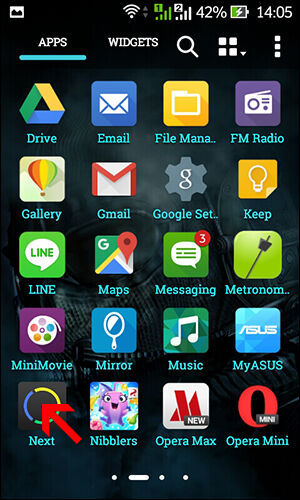
  2. Then open the app
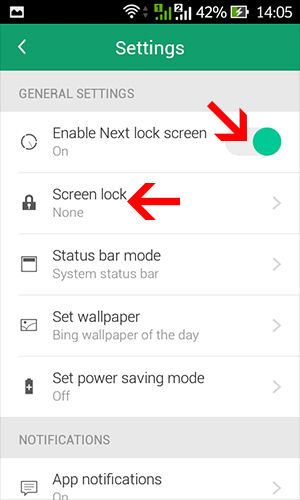
  3. Click on "Enable Next Lock Screen" to activate it. You also can set a pattern or PIN to unlock it in the "Lock Screen".
  4. Now, you can lock your phone to use this Screen Lock Next.
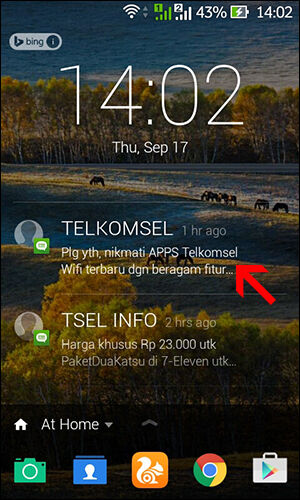
  5. You can see in the middle, there is a notification SMS that you can access.
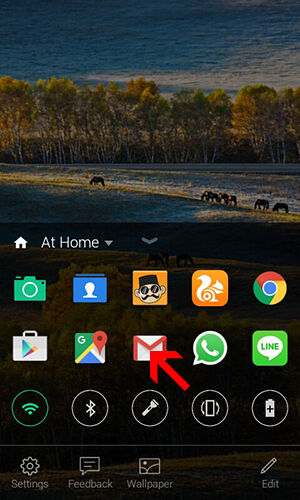
  6. At the bottom, there are various applications that can direct you access by clicking twice on the icon.
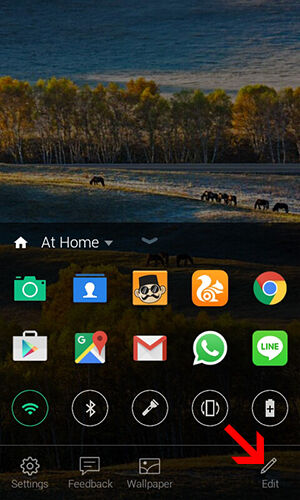
  7. You can also set the application or any tools that you want displayed on Lock Screen Next it. Just click the icon "Edit" at the bottom.


 thats how to open app even screnn is locked.
thx for reading this post.
sources :https://jalantikus.com/tips/cara-buka-aplikasi-android-langsung-dari-lockscreen/
How to unlock smarphone using e-KTP

THIS STEP BY STEP HOW TO UNLOCK YOUR SMARTPHONE USING e-ID (ELEKTRONIC IDENTITY CARD)

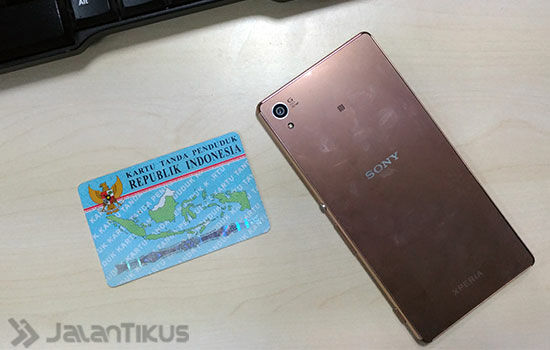
  1.  Make sure the smartphone you already use at least Android Lollipop and have NFC technology. And you have to have the E-ID card offcourse :D.
    NFC (Near Field Communication) is a technology that allows two devices to communicate with each other by gluing or attaching both.  
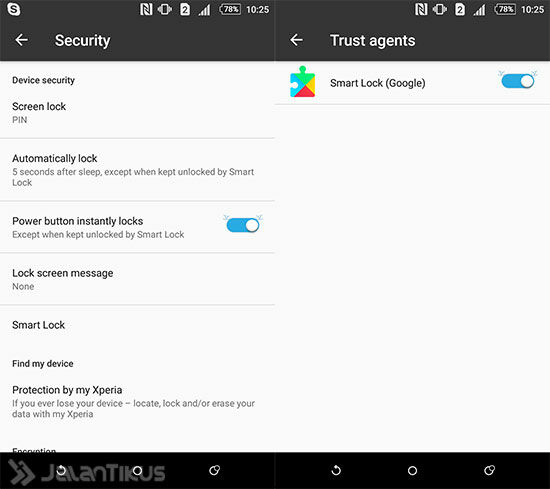
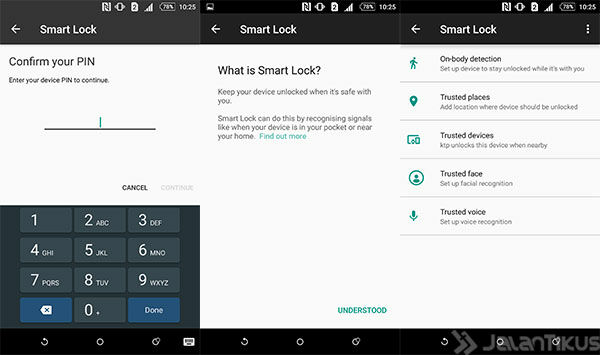
  2. Make sure your smartphone NFC enabled. When everything is ready, then enter the menu Settings - Security - Smart Lock. If Smart Lock is not activated, please activate from Settings - Security - Trusted Agents.
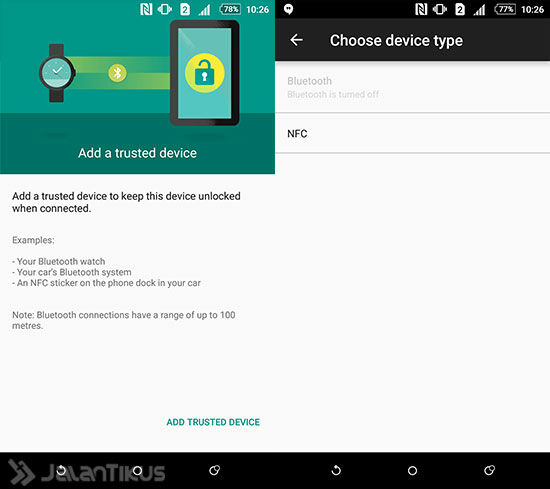
  3. On the Smart Lock, choose Trusted Devices.
  4. In the next display, please select the NFC Trusted Devices option
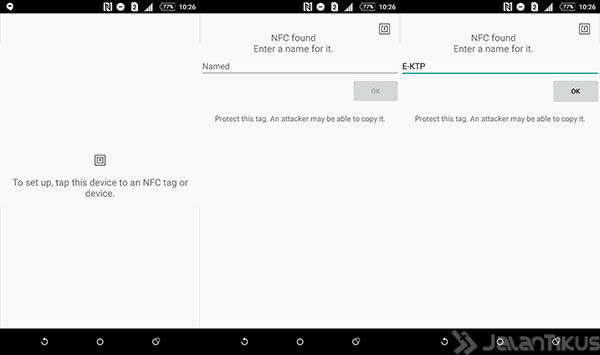
  5. Then paste the e-ID card to the NFC. If successful legible, it will display a command to name the NFC device that you registered earlier. Here named "E-ID", but you can menamaninya at will.
  6. Completed, you can open your lockscreen Android smartphone. It's easy? lockscreen android open the way to use E-ID. If you have other ways that are unique and quirky, yes please Your share in the comments down below. Thank you and good luck!
  7.  sources : https://jalantikus.com/tips/cara-buka-lockscreen-android-pakai-ektp/